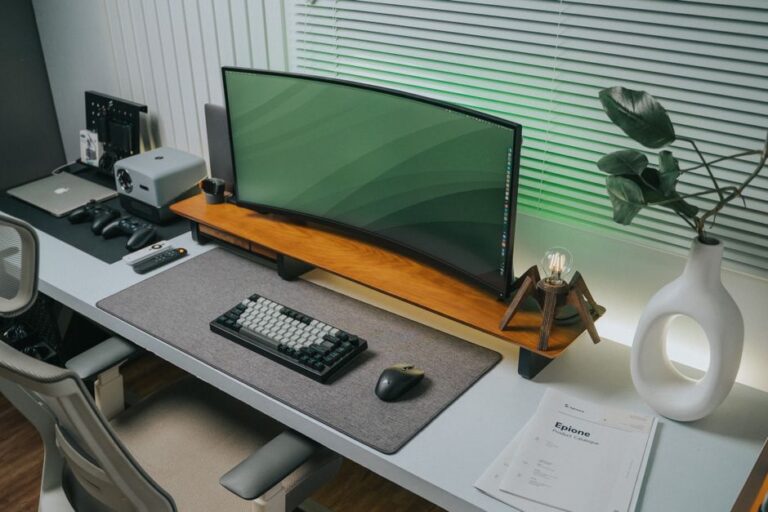
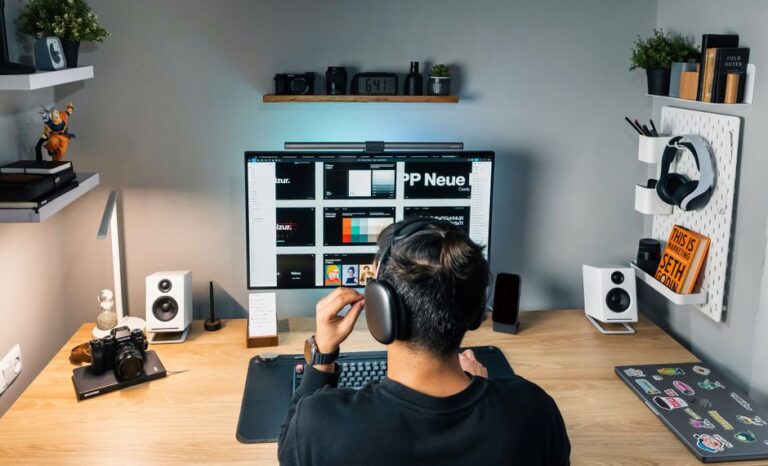
The Importance of an Optimized Personal Workspace Setup
Creating the perfect personal workspace setup is essential for enhancing productivity, focus, and overall well-being. Whether you’re working from home or in an office, the environment significantly influences your work habits. An optimized workspace helps reduce distractions, increase efficiency, and support a better work-life balance. A thoughtfully arranged workspace can also foster creativity and motivate you to reach your goals, turning the mundane into something fulfilling.
Key Elements of an Effective Workspace
To achieve an optimal workspace, several fundamental components must be considered. Below are the key elements that contribute to a productive environment, each playing a vital role in creating a comfortable and efficient setup.
- Ergonomic Furniture: Invest in a comfortable chair and desk that support your body and promote good posture. Proper seating can alleviate back pain and contribute to overall health.
- Lighting: Ensure that adequate illumination is provided to reduce eye strain. Consider combining natural light with adjustable lighting to suit your needs throughout the day.
- Technology: Utilize reliable equipment, including computers, routers, and other gadgets. These tools should support your workflow rather than hinder it, significantly impacting your productivity.
- Organization Tools: Implement shelves, filing cabinets, and organizers to declutter your space. A well-organized workspace can lead to fewer distractions and an easier time locating necessary items.
- Personal Touches: Add elements that inspire you, such as plants, artwork, or motivational quotes. These touches can create a pleasant atmosphere that encourages creativity.
Ergonomics: A Crucial Aspect of Workspace Optimization
Proper ergonomics in your workspace setup can prevent discomfort and potential injuries, impacting your ability to work effectively. Here are several important factors to consider:
- Chair Height: Your feet should be flat on the floor, and your knees should be at a 90-degree angle. This positioning alleviates pressure on your back and promotes better circulation.
- Desk Height: Ensure that your elbows are at a right angle when typing. This height allows for comfortable arm positioning and reduces strain on the wrists.
- Screen Position: Position your monitor at eye level to avoid neck strain. Sitting directly in front of the screen prevents you from leaning forward, which can lead to muscular discomfort.
Maximizing Natural Light in Your Workspace
Natural light plays a crucial role in enhancing mood, productivity, and overall well-being. Effective strategies to optimize natural light in your workspace include:
- Positioning: Arrange your desk near windows to benefit from daylight. Working in a sunlit area can boost your energy levels and keep you alert.
- Window Treatments: Use blinds or sheer curtains to control glare without blocking out light. These treatments allow you to maintain brightness while preventing distractions from the outdoors.
- Mirrors: Strategically placing mirrors can help reflect light and make your space feel larger. This simple addition can also elevate your mood and make the environment more inviting.
Creating a Distraction-Free Environment
A cluttered and noisy environment can significantly hinder focus and reduce productivity. Here are practical tips for minimizing distractions in your workspace:
- Noise Control: Use noise-canceling headphones or play soft background music to maintain concentration. Music can enhance focus, making tedious tasks feel more manageable.
- Digital Declutter: Regularly keep your computer desktop organized and limit the number of open applications and tabs. Digital chaos can lead to mental clutter, making it harder to concentrate.
- Set Boundaries: Communicate with others about your work hours to minimize interruptions. Establishing clear guidelines helps others respect your focused time.
Utilizing Technology for Enhanced Productivity
In our tech-driven world, leveraging the right tools can make a substantial difference in productivity. Consider implementing the following technologies to optimize your work process:
- Productivity Apps: Use tools like Trello or Asana to keep track of tasks and deadlines. These platforms help you visualize your workload and prioritize effectively.
- Time Management Tools: Pomodoro timers or focus apps can help maintain engagement without burnout. These tools encourage short breaks, which can refresh your mind and enhance long-term focus.
- Cloud Storage Solutions: Services like Google Drive or Dropbox ensure your documents are accessible from anywhere, offering flexibility and peace of mind regarding data security.
Fostering a Comfortable Working Environment
Your workspace should be comfortable and conducive to productivity. Here are suggestions to enhance your physical environment:
- Climate Control: Maintain a comfortable temperature through efficient heating and air conditioning options. A comfortable climate prevents discomfort and minimizes distractions.
- Aromatherapy: Utilize essential oils or scented candles to create a pleasant atmosphere. Aromatherapy can help reduce stress and increase feelings of relaxation, making your workspace inviting.
- Break Area: If possible, set up a small area for breaks to refresh your mind and body. A designated spot for mindfulness or relaxation can improve your overall productivity.
FAQ: Frequently Asked Questions
1. What are the benefits of an ergonomic workspace?
An ergonomic workspace reduces the risk of musculoskeletal injuries, enhances comfort, and significantly increases productivity. It cultivates an environment where you can thrive rather than endure discomfort.
2. How can I improve lighting in my home office?
Maximize natural light by placing your desk near windows and supplementing it with adjustable task lighting when needed. Experimenting with different lighting setups can lead to optimal conditions for your workflow.
3. What types of technology can boost productivity?
Productivity apps, time management tools, and cloud storage solutions can significantly enhance your workflow. Integrating these tools allows for streamlined processes that foster seamless collaboration and organization.
4. How do I create a distraction-free workspace?
Use noise-canceling headphones, maintain an organized digital and physical space, and set clear work boundaries with others. Establishing a focused environment is key to maximizing your efficiency and creativity.
5. What personal touches can make my workspace more enjoyable?
Incorporate items like plants, artwork, or personal memorabilia to inspire creativity and comfort in your workspace. Personalization can transform a sterile work area into a space that reflects your identity and motivates you.